Inverter Control Guide
This guide covers battery and schedule control for every supported hybrid family. Choose your model from the table of contents below.
Table of Contents
- Control Model Overview
- MOD GEN4 — TOU Schedule (9 Slots)
- SPH GEN3 — Extended Time Periods
- WIT TL3 — VPP Remote Control
- SPF — Off-Grid Output Priority
- MIN TL-XH — Hybrid Mode
- Common Automation Patterns
- Troubleshooting Controls
Control Model Overview
Each inverter family uses a different control paradigm. Understanding which one applies to your hardware will save significant debugging time.
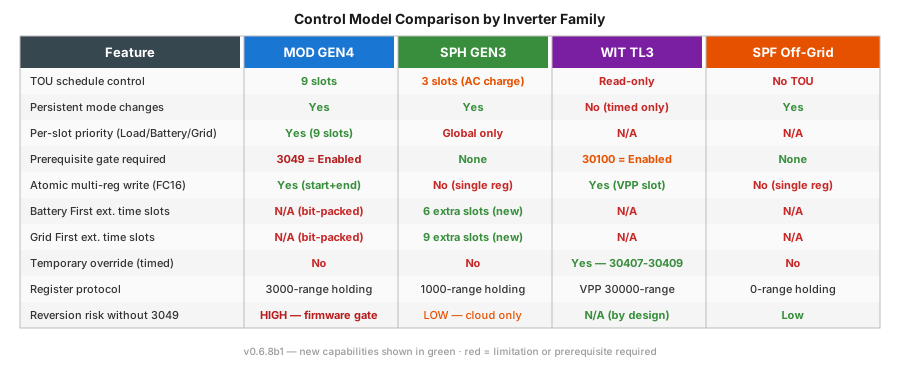
| Family | Control style | Persistence | Key prerequisite |
|---|---|---|---|
| MOD GEN4 (TL3-XH) | TOU schedule, 9 time slots, per-slot priority | Persistent | Register 3049 must be Enabled |
| SPH GEN3 | Global priority + up to 9 extended time slots | Persistent | None |
| WIT TL3 | VPP remote overrides (time-limited) | Timed only | Register 30100 must be Enabled |
| SPF | Output priority + charge source | Persistent | None |
| MIN TL-XH | Simple priority mode | Persistent | None |
Grid-tied models (MIN TL-X, MIC, MID) have no battery controls and are not covered here.
MOD GEN4 — TOU Schedule (9 Slots)
Applies to: MOD 6000–15000 TL3-XH (three-phase hybrid with battery)
How TOU Works on MOD GEN4
The MOD GEN4 inverter uses a 9-slot time-of-use schedule stored in holding registers 3038–3059. Each slot defines a time window (start + end) and a priority mode (Load First, Battery First, or Grid First). The inverter switches priority automatically as the clock enters each window.
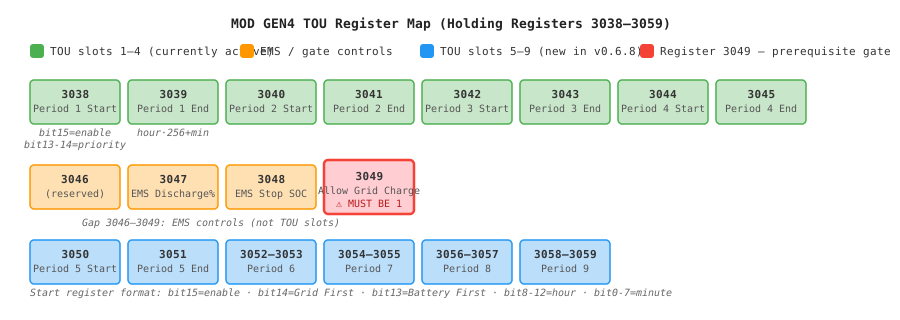
Critical: Registers 3046–3049 are not TOU slots. This gap is intentional. Registers 3047–3048 are EMS rate/SOC controls. Register 3049 ("Allow Grid Charge") is a prerequisite gate — TOU writes will silently revert if it is Disabled.
Step-by-Step Setup
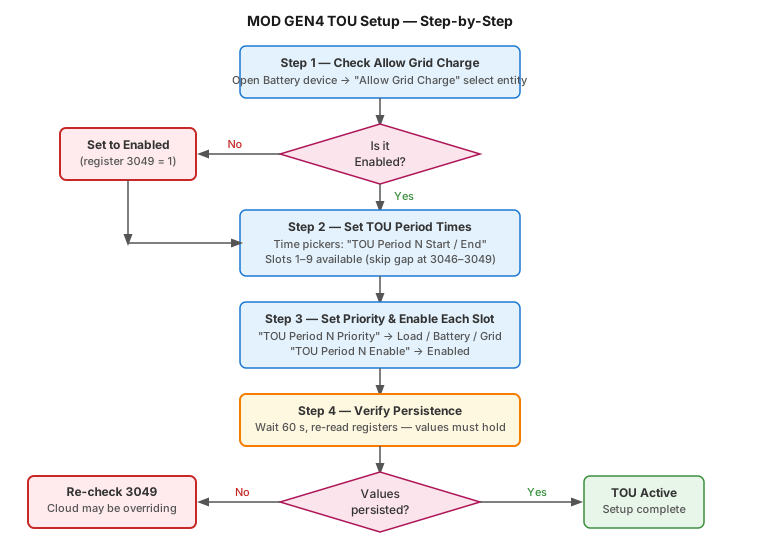
Step 1 — Enable Allow Grid Charge (Critical)
Before any TOU period will persist, register 3049 must be set to Enabled.
In Home Assistant: 1. Open the Battery device for your inverter 2. Find the "Allow Grid Charge" select entity 3. Set it to Enabled 4. Confirm it reads back as Enabled after the next poll cycle (~30 s)
If this entity is not visible, confirm you are on the MOD TL3-XH profile. Grid-tied (TL3-X) models do not have this register.
To verify via raw register (optional — requires the diagnostic actions):
action: growatt_modbus.read_register
data:
  device_id: YOUR_DEVICE_ID
  register_type: holding
  register: 3049
# Expected response: 1 (Enabled)
Step 2 — Configure Time Windows
Each of the 9 slots has two time-picker entities:
- TOU Period N Start — when the slot begins (HH:MM)
- TOU Period N End — when the slot ends (HH:MM)
Set these via the time entity controls under the Battery device. Start and end are always written together in a single atomic Modbus FC16 transaction — this prevents the inverter from ever seeing a partial update.
Slot layout:
| Slot | Registers | Notes |
|---|---|---|
| 1 | 3038 (start), 3039 (end) | |
| 2 | 3040, 3041 | |
| 3 | 3042, 3043 | |
| 4 | 3044, 3045 | |
| — | 3046–3049 | EMS controls, not TOU |
| 5 | 3050, 3051 | New in v0.6.8 |
| 6 | 3052, 3053 | New in v0.6.8 |
| 7 | 3054, 3055 | New in v0.6.8 |
| 8 | 3056, 3057 | New in v0.6.8 |
| 9 | 3058, 3059 | New in v0.6.8 |
Unused slots should be left Disabled (the enable entity defaults to Disabled).
Step 3 — Set Priority for Each Active Slot
Each slot has a "TOU Period N Priority" select entity:
| Option | Behaviour |
|---|---|
| Load Priority | Solar → Load → Battery → Grid |
| Battery Priority | Solar → Battery → Load (grid backup only) |
| Grid Priority | Grid charges battery; solar export priority |
Slots you leave Disabled do not need a priority set.
Step 4 — Enable Each Slot
Set each active slot's "TOU Period N Enable" select entity to Enabled. Only enabled slots are executed by the inverter.
Step 5 — Verify Persistence
After configuring all slots: 1. Wait 60 seconds (one full poll cycle minimum) 2. Re-read the start register of slot 1 using the diagnostic actions or by checking the time entity's current value 3. If the value matches what you wrote, TOU is working correctly 4. If it reverted, go back to Step 1 and confirm register 3049 reads 1
Example: Peak Tariff Avoidance (Battery First 18:00–22:00)
Configure slot 1:
- Start: 18:00
- End: 22:00
- Priority: Battery Priority
- Enable: Enabled
All other slots: leave Disabled (or configure as needed for off-peak charging).
HA Automation Example
automation:
  - alias: "MOD — Enable peak-hour battery discharge"
    trigger:
      - platform: time
        at: "17:55:00"
    action:
      - action: select.select_option
        target:
          entity_id: select.growatt_tou_period_1_priority
        data:
          option: "Battery Priority"
      - action: select.select_option
        target:
          entity_id: select.growatt_tou_period_1_enable
        data:
          option: "Enabled"
Since the schedule is persistent, this automation only needs to run once (or at HA restart to re-assert after a power cut). There is no need to poll or repeat writes.
Start Register Bit Format (Advanced)
Each start register encodes three fields:
Bit 15    : Enable (1 = slot active)
Bits 14   : Grid First flag
Bit  13   : Battery First flag  (Bits 14+13 = 0 → Load First)
Bits 12–8 : Hour (0–23)
Bits  7–0 : Minute (0–59)
Example — Battery First, 06:00, Enabled:
You normally never need to compute this manually — the Priority and Enable select entities handle the bit-packing automatically.
SPH GEN3 — Extended Time Periods
Applies to: SPH 3000–10000 TL, SPH/SPM 8000–10000 TL-HU (with caveats — see below)
How SPH Time Periods Work
SPH inverters use a simpler model than MOD. A single Priority Mode register (1044) sets the global default:
| Value | Mode | Description |
|---|---|---|
| 0 | Load First | Power loads before charging battery |
| 1 | Battery First | Prioritise battery charging from solar |
| 2 | Grid First | Allow grid to charge battery |
Time periods override this global default within defined windows. Periods use separate enable registers (not bit-packed like MOD).
Priority Mode drives the first time slot — the firmware, not the integration
Setting Priority Mode does not act alone. On SPH firmware the inverter implements it by toggling the enable bit of the first slot for that mode, in the same second:
08:00:37  Priority Mode                  -> Grid First
08:00:37  Grid First Period 1 Enable     -> Enabled
08:15:22  Priority Mode                  -> Load First
08:15:22  Grid First Period 1 Enable     -> Disabled
| Priority Mode | Slot the firmware toggles | Register |
|---|---|---|
| Grid First | Grid First Period 1 Enable | 1082 |
| Battery First | Battery First Period 1 Enable | 1102 |
Two consequences:
- That enable entity changing on its own is not a fault, and not the Growatt cloud overwriting you. It is the inverter doing what you asked.
- Configure that first slot as
00:00–23:59and leave its enable alone. If the window is narrow, or unset, the mode only takes effect inside that window — which looks like Priority Mode being ignored at other times of day.
Confirmed on an SPH 4.6E (firmware RBBA060406/ZCBC-0006) from Home Assistant's own activity log across two full cycles, reported on #388. The Grid First linkage is directly observed; the Battery First one follows the same pattern and is expected rather than confirmed.
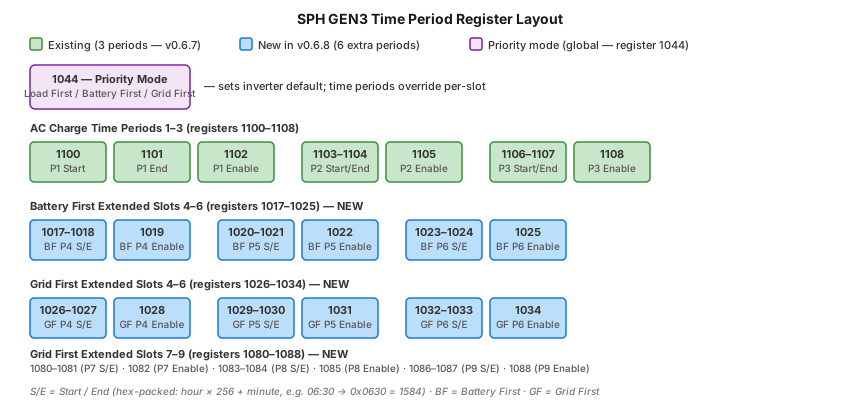
Available Time Period Entities
Standard (3 slots — all SPH models since v0.6.0)
| Entity | Register | Purpose |
|---|---|---|
| Battery First Period 1 Start / End | 1100, 1101 | Battery First window 1 |
| Battery First Period 1 Enable | 1102 | Enable/disable slot 1 |
| Battery First Period 2 Start / End | 1103, 1104 | Battery First window 2 |
| Battery First Period 2 Enable | 1105 | Enable/disable slot 2 |
| Battery First Period 3 Start / End | 1106, 1107 | Battery First window 3 |
| Battery First Period 3 Enable | 1108 | Enable/disable slot 3 |
Renamed in v1.6.7. These displayed as "Time Period 1–3" and the Grid First slots below as "Grid First Time Period 7–9", which matched neither the Growatt app nor the protocol. Entity IDs are unchanged, so automations still work — only the displayed names moved.
Battery First Extended Slots 4–6 (new in v0.6.8)
| Entity | Register | Purpose |
|---|---|---|
| Batt First Time Period 4 Start / End | 1017, 1018 | Battery First window 4 |
| Batt First Time Period 4 Enable | 1019 | Enable slot |
| Batt First Time Period 5 Start / End | 1020, 1021 | Battery First window 5 |
| Batt First Time Period 5 Enable | 1022 | Enable slot |
| Batt First Time Period 6 Start / End | 1023, 1024 | Battery First window 6 |
| Batt First Time Period 6 Enable | 1025 | Enable slot |
Grid First Extended Slots 4–9 (new in v0.6.8)
| Entity | Register | Purpose |
|---|---|---|
| Grid First Period 4–6 Start/End | 1026–1033 | Grid First windows 4–6 |
| Grid First Period 4–6 Enable | 1028, 1031, 1034 | Enable each slot |
| Grid First Period 1–3 Start/End | 1080–1087 | Grid First windows 1–3 |
| Grid First Period 1–3 Enable | 1082, 1085, 1088 | Enable each slot |
A schedule set in ShinePhone wins, and you cannot see it from here
Periods created in ShinePhone → Advanced Setting → TimeElectricity Price are not the
same thing as the time period entities or sync_tou_schedule. They are not exposed over
Modbus, do not appear in diagnostics, and take effect regardless of what this
integration sets.
The symptom is an inverter doing something nothing in Home Assistant explains - typically charging from the grid - while every control you change reverts or appears to be ignored. Delete the period in the app; the change takes effect within a poll (#448).
SPH HU note: The SPH 8000–10000 TL-HU uses a different holding register architecture. Battery management registers (1044, 1070–1071, 1090–1108) return Modbus exceptions on HU hardware — these settings must be made via the inverter LCD or ShinePhone app. The extended time period registers (1017–1088) have not been validated on HU hardware.
Setting Up Time Periods on SPH
Step 1 — Set Global Priority Mode
- Open the Battery device
- Find "Priority Mode" select entity
- Choose Load First, Battery First, or Grid First
This is the default mode outside any configured time windows.
Step 2 — Configure Time Windows
For each active slot:
1. Set the Start time (e.g., 22:00)
2. Set the End time (e.g., 06:00)
3. Set the Enable select to Enabled
Time values are stored as hex-packed integers:
hour × 256 + minute. For example, 06:30 =0x0630= 1584. The integration handles this encoding automatically via the time picker entity.
Example: Off-Peak Grid Charging (22:00–06:00)
Set Priority Mode to Grid First, then:
- Battery First Period 1 Start: 22:00
- Battery First Period 1 End: 06:00
- Battery First Period 1 Enable: Enabled
- All other periods: Disabled
Check this against your own inverter before relying on it. Registers 1100–1102 are the Battery First slot 1, so this example pairs a Grid First priority with a Battery First window. That combination is what was originally documented here and it may well be how SPH firmware expects grid charging to be scheduled — but it has not been re-verified on hardware since the slots were correctly named in v1.6.7. If your inverter behaves differently, please say so on the issue tracker.
automation:
  - alias: "SPH — Arm off-peak grid charge"
    trigger:
      - platform: time
        at: "21:55:00"
    action:
      - action: select.select_option
        target:
          entity_id: select.growatt_ac_charge_enable
        data:
          option: "Enabled"
      - action: select.select_option
        target:
          entity_id: select.growatt_time_period_1_enable
        data:
          option: "Enabled"
SPH Reversion Risk
SPH GEN3 has no register 3049 equivalent. Reversion is almost always caused by the ShineWiFi cloud service overwriting registers during its sync window. To reduce this:
- Disable cloud sync in the ShineWiFi dongle settings (if your firmware supports it)
- Or time HA writes to avoid the typical cloud sync window (often 00:00–01:00)
- Debug logging will show
write succeeded but value revertedif cloud interference occurs
Overlapping periods are refused by the inverter
Writing a time period that overlaps an already-enabled period is rejected outright:
WARNING: write_registers(1106, 3 values) refused by the device:
         ExceptionResponse(dev_id=1, function_code=144, exception_code=4)
Exception code 4 is Slave Device Failure. This applies both to two periods of the same mode and — confirmed on an SPH-TL3 — to a charge window overlapping an active discharge window (#411).
This is correct behaviour, not a fault. The write is refused as a whole, nothing is partially applied, and the schedule already running continues uninterrupted.
If you drive slots from an automation or a price optimiser, disable the conflicting slot
before writing the new one — write [23:59, 23:59, 0] to the opposing slot as one atomic
triple, allow it to settle, then write the period you want.
The disable-then-enable pattern, confirmed under load
This sequence has been run against a genuinely busy night — 28 register writes driven by Predbat in expert mode, revising its own plan repeatedly as prices updated — with zero rejections (#417, @Vict20):
- Before writing an enabled period, read the opposing mode's enable state from its
selectentity. - If it is active, write
[23:59, 23:59, 0]to that opposing slot — one atomic triple viawrite_registers, never a bare single-register write. - Wait about 2 seconds for it to settle.
- Write the real
[start, end, enable]triple for the slot you actually want.
Two details that made the difference:
- Every write is a three-register triple. Writing
start,endandenableindividually can leave the inverter briefly holding a period that overlaps the running one, which is both a rejection risk and how partially-written periods appear. - Only the final state of a revised plan is written. An optimiser that rewrites the same window two or three times before settling should collapse those into one write, rather than firing on every intermediate change.
Cross-checking the integration's debug log against the optimiser's own record of intended writes showed every decision reaching the inverter, 8–17 seconds later (the automation's settle delay), with no missing writes and no register changes that could not be accounted for.
This is firmware behaviour rather than anything SPH-specific, so the same pattern should apply on other families that refuse overlapping enabled periods.
The inverter's SoC reserve is a separate protection
A discharge window does not run the battery flat. Discharge throttles to near zero as SoC approaches your configured reserve floor, whatever the schedule says — observed ending about 20 minutes before a scheduled window closed. The schedule and the reserve are independent limits and the inverter respects whichever binds first.
WIT TL3 — VPP Remote Control
Applies to: WIT 4000–15000 TL3 (three-phase hybrid)
Key Difference from SPH/MOD
WIT inverters use the VPP (Virtual Power Plant) Protocol. All control commands are time-limited overrides, not persistent mode changes. Register 30476 (priority mode) is read-only — it shows what mode the TOU schedule will return to when an override expires.
You cannot permanently change the WIT operating mode via Modbus. All overrides expire when their duration timer reaches zero.
VPP Control Entities
Control Authority (Register 30100) — One-time Setup
Entity: select.{name}_control_authority
Must be set to Enabled before any remote control registers will be accepted. This is a one-time setup step that persists across inverter restarts.
action: select.select_option
target:
  entity_id: select.growatt_control_authority
data:
  option: "Enabled"
Remote Power Control (Registers 30407–30409)
Three registers work together to issue a timed charge/discharge command:
| Entity | Register | Range | Description |
|---|---|---|---|
| Remote Power Control Enable | 30407 | 0/1 | Activate the override |
| Remote Charging Time | 30408 | 0–1440 min | How long the override runs |
| Remote Charge/Discharge Power | 30409 | −100 to +100 % | Power level (+ charge, − discharge) |
Sequence to issue a command:
1. Set Remote Charging Time to desired duration
2. Set Remote Charge/Discharge Power to desired level
3. Set Remote Power Control Enable to Enabled — override starts immediately
4. When the timer expires, the inverter returns to its TOU schedule default
Legacy VPP Registers (201–202)
| Entity | Register | Description |
|---|---|---|
| Active Power Rate | 201 | Max power % for the operation |
| Work Mode | 202 | 0=Standby, 1=Charge, 2=Discharge |
These are an alternative control path. For most use cases, prefer 30407–30409 which offer explicit duration control.
Common WIT Control Patterns
Pattern 1 — Charge Battery for 2 Hours (off-peak grid energy)
automation:
  - alias: "WIT — charge battery at off-peak rate"
    trigger:
      - platform: time
        at: "23:00:00"
    action:
      - action: number.set_value
        target:
          entity_id: number.growatt_remote_charging_time
        data:
          value: 120
      - action: number.set_value
        target:
          entity_id: number.growatt_remote_charge_discharge_power
        data:
          value: 80        # 80% charge rate
      - action: select.select_option
        target:
          entity_id: select.growatt_remote_power_control_enable
        data:
          option: "Enabled"
Pattern 2 — Discharge Battery During Peak Tariff (3 hours)
automation:
  - alias: "WIT — discharge during peak"
    trigger:
      - platform: time
        at: "17:00:00"
    action:
      - action: number.set_value
        target:
          entity_id: number.growatt_remote_charging_time
        data:
          value: 180
      - action: number.set_value
        target:
          entity_id: number.growatt_remote_charge_discharge_power
        data:
          value: -80       # 80% discharge to grid
      - action: select.select_option
        target:
          entity_id: select.growatt_remote_power_control_enable
        data:
          option: "Enabled"
Pattern 3 — Cancel Active Override Immediately
action: select.select_option
target:
  entity_id: select.growatt_remote_power_control_enable
data:
  option: "Disabled"
WIT Rate Limiting
The integration enforces a 30-second minimum interval between WIT control writes. This prevents oscillation from rapid automation triggers. If you write within 30 seconds of a previous write the request is silently dropped and a warning is logged:
Design automations to issue commands once per session, not on a continuous loop.
VPP TOU Period Control (Registers 30412–30414)
WIT also supports configuring a single TOU period directly via VPP:
| Register | Contents |
|---|---|
| 30412 | TOU Period 1 start (minutes from midnight) |
| 30413 | TOU Period 1 end (minutes from midnight) |
| 30414 | Power level (%) |
This is handled by the WIT VPP Battery Mode select entity. The integration writes all three registers atomically via FC16 when the option changes.
SPF — Off-Grid Output Priority
Applies to: SPF 3000–6000 ES PLUS
SPF inverters prioritise power sources, not TOU schedules. The key controls are:
Output Priority (Register 1 — output_config)
| Option | Mode | Use case |
|---|---|---|
| SBU (Battery First) | Solar → Battery → Utility | Maximise self-consumption |
| SOL (Solar First) | Solar → Utility → Battery | Export-priority mode |
| UTI (Utility First) | Utility → Solar → Battery | Grid stability / generator backup |
| SUB (Solar & Utility) | Solar + Utility → Battery | Blended charging |
Charge Priority (Register 2 — charge_config)
| Option | Mode |
|---|---|
| CSO | Solar Only charges battery |
| SNU | Solar + Utility can charge |
| OSO | Only Solar — grid charge disabled |
Other Controls
| Entity | Register | Description |
|---|---|---|
| AC Charge Current | 38 | Max grid charge current (0–80 A) |
| Battery Type | 39 | AGM / Flooded / Lithium / User |
| AC Input Mode | 8 | APL / UPS / GEN (generator input) |
| Battery to Grid threshold | 37 | SOC % or voltage to switch to grid |
| Grid to Battery threshold | 95 | SOC % or voltage to switch back to battery |
bat_low_to_utiandac_to_bat_voltare battery-type-dependent. For Lithium, the value is SOC percentage (0–100). For lead-acid, the value is voltage (×0.1 V, e.g. 480 = 48.0 V).
Example: Solar-First with Grid Backup
action: select.select_option
target:
  entity_id: select.growatt_output_config
data:
  option: "SOL (Solar First)"
MIN TL-XH — Hybrid Mode
Applies to: MIN 3000–10000 TL-XH (single-phase hybrid)
MIN TL-XH uses the SPH control register set. The same priority mode (register 1044) and time period registers (1100–1108) apply.
See SPH GEN3 — Extended Time Periods above for the full entity reference.
Common Automation Patterns
Detect and Respond to Grid Export Limit Breach
automation:
  - alias: "Reduce battery charge when exporting too much"
    trigger:
      - platform: numeric_state
        entity_id: sensor.growatt_grid_export_power
        above: 3500
        for:
          minutes: 5
    condition:
      - condition: state
        entity_id: select.growatt_priority_mode
        state: "Grid First"
    action:
      - action: select.select_option
        target:
          entity_id: select.growatt_priority_mode
        data:
          option: "Load First"
SOC-Based Priority Switching (SPH / MOD)
automation:
  - alias: "Switch to battery discharge at peak"
    trigger:
      - platform: time
        at: "17:00:00"
    condition:
      - condition: numeric_state
        entity_id: sensor.growatt_battery_battery_soc
        above: 30
    action:
      - action: select.select_option
        target:
          entity_id: select.growatt_priority_mode
        data:
          option: "Battery First"

  - alias: "Return to load-first when battery low"
    trigger:
      - platform: numeric_state
        entity_id: sensor.growatt_battery_battery_soc
        below: 20
    action:
      - action: select.select_option
        target:
          entity_id: select.growatt_priority_mode
        data:
          option: "Load First"
Force Charge from Grid to Target SOC (WIT)
automation:
  - alias: "WIT — charge to 80% off-peak"
    trigger:
      - platform: time
        at: "01:00:00"
    condition:
      - condition: numeric_state
        entity_id: sensor.growatt_battery_battery_soc
        below: 80
    action:
      - action: number.set_value
        target:
          entity_id: number.growatt_remote_charging_time
        data:
          value: 240        # 4-hour window
      - action: number.set_value
        target:
          entity_id: number.growatt_remote_charge_discharge_power
        data:
          value: 60
      - action: select.select_option
        target:
          entity_id: select.growatt_remote_power_control_enable
        data:
          option: "Enabled"
Troubleshooting Controls
Setting reverts after ~60 seconds
Most likely cause: Cloud service (ShineWiFi) overwriting the register.
Diagnosis: Enable debug logging and look for:
Solutions:
1. MOD GEN4: Ensure register 3049 (allow_grid_charge) is set to Enabled. This is the most common root cause for MOD and is distinct from cloud interference.
2. All models: If the ShineWiFi dongle is connected, its cloud sync can periodically overwrite registers. Disable cloud sync in the dongle's web UI if your firmware supports it.
3. Use the growatt_modbus.read_register service to verify the register value immediately after writing to confirm whether the write is being accepted.
Entity not appearing in HA
- Confirm you are on the correct profile (Settings → Devices & Services → Growatt → Configure)
- For MOD GEN4 control entities: the profile must be MOD TL3-XH, and register 3038 must be present in holding registers (verified during auto-detection)
- For SPH extended time periods: registers 1017–1088 must be present in the profile's holding_registers definition — verify with the Universal Register Scanner
- Check HA logs for entity creation messages:
INFO — MOD TOU priority/enable controls enabled
Write silently fails (no error, value stays unchanged)
- Check you are writing to a holding register (FC06/FC16), not an input register (FC04)
- Verify slave ID — some adapters require slave ID 1, others use the inverter's configured address
- Try
growatt_modbus.write_registers(plural) from Settings → Tools → Actions to isolate the issue from the entity - write the[start, end, enable]triple, not one word
A single-register write can be refused where the entity's write works
growatt_modbus.write_register (singular) sends FC06, one register at a time. The time
entities send FC16 for the whole triple, and some firmware accepts only the second.
Measured on a MOD 10KTL3-XH, firmware DN1.0
(#349): FC06 on the slot end
words 3041, 3055 and 3059 returned exception 2 (Illegal Data Address) on every attempt,
while FC16 on the pair was accepted on all nine slots. The start word 3050 did accept FC06.
So an FC06 refusal there is not evidence that the slot is broken or unsupported - it can refuse while the control that uses it works normally. Use the plural action to test.
And write a value that differs from the current one. Writing a register's own value back makes the read-back match whether or not anything landed, so a success proves nothing. A refusal still counts.
MOD TOU slots 5–9 not appearing
Slots 5–9 use registers 3050–3059. These must be present in the holding_registers of your profile. Verify:
action: growatt_modbus.read_register
data:
  device_id: YOUR_DEVICE_ID
  register_type: holding
  register: 3050
Enable Debug Logging
Key log prefixes to look for:
- [MOD TOU] — TOU register reads and write operations
- [SPH CTRL] — SPH battery control reads
- [WIT CTRL] — WIT VPP remote control writes
- [WRITE_MULTI] — FC16 atomic multi-register writes
Further Reading
Last updated: v0.8.2 · 2026-04-19