Supported Models and Sensor Availability¶
How Auto-Detection Works¶
When you add the integration, it attempts to identify your inverter automatically before asking you to choose a profile.
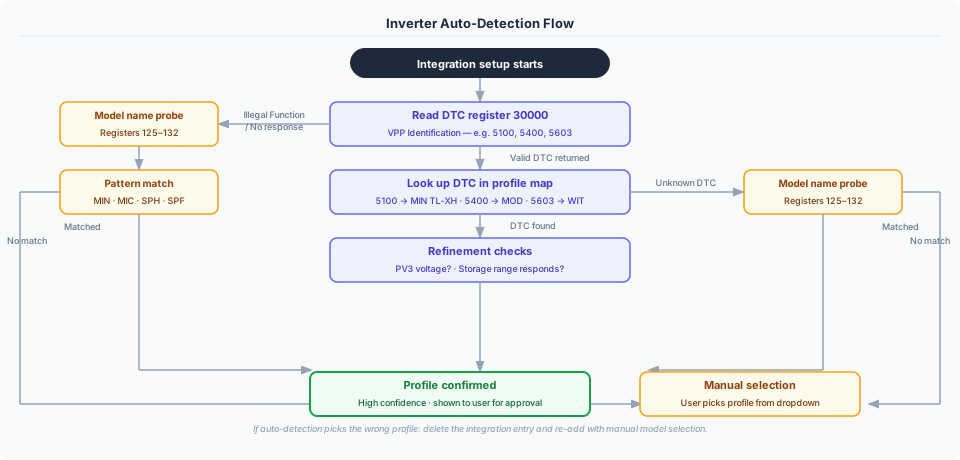
Key points:
- VPP-capable inverters (DTC present) are identified with high confidence
- Legacy inverters (no DTC) use model name probing — works for MIN, MIC, SPH families
- If auto-detection picks the wrong profile, delete and re-add the integration with manual selection
- The Universal Register Scanner (Settings → Tools → Actions) shows the detection reasoning in its output
Supported Models¶
Single-Phase Grid-Tied¶
| Model | Range | PV Strings | VPP Support | Auto-detect | Tested | Notes |
|---|---|---|---|---|---|---|
| MIC 600-3300TL-X | 0.6–3.3 kW | 1 | Legacy only | Model name | ✅ | Micro inverter |
| MIN 3000-6000TL-X | 3–6 kW | 2 | VPP + Legacy | Model name | ✅ | |
| MIN 7000-10000TL-X | 7–10 kW | 3 | VPP + Legacy | Model name | ✅ |
Single-Phase Hybrid (with Battery)¶
| Model | Range | PV Strings | VPP Support | Auto-detect | Tested | Notes |
|---|---|---|---|---|---|---|
| MIN TL-XH 3000-10000 | 3–10 kW | 2–3 | VPP | DTC 5100 | ✅ | 3–6kW: 2 strings; 7–10kW: 3 strings |
| MIN TL-XH2 3000-10000 | 3–10 kW | 2–3 | VPP only | Manual (shares DTC 5100) | ✅ | Answers only the VPP ranges; select this profile by hand (#461) |
| SPA 3000-6000TL BL | 3–6 kW | None | Legacy only | Auto | ✅ | AC-coupled storage only — no PV DC inputs |
| SPE 8000-12000 ES | 8–12 kW | 2 | VPP-like | Model name | ✅ | Peak shaving, parallel operation |
| SPH 3000-6000 | 3–6 kW | 2 | VPP + Legacy | Model name | ✅ | |
| SPH 7000-10000 | 7–10 kW | 2 | VPP + Legacy | Model name | ✅ | |
| SPH/SPM 8000-10000 HU | 8–10 kW | 3 | VPP + Legacy | DTC | ⚠️ | BMS monitoring (SOH, cell voltages). Also used for the SPM 6000TL-HU (DTC 21304) |
Single-Phase Off-Grid¶
| Model | Range | PV Strings | VPP Support | Auto-detect | Tested | Notes |
|---|---|---|---|---|---|---|
| SPF 3000-6000 ES PLUS | 3–6 kW | 2 | Off-grid protocol | Manual | ✅ | No grid export; grid = AC input only |
Three-Phase¶
| Model | Range | PV Strings | Battery | VPP Support | Auto-detect | Tested | Notes |
|---|---|---|---|---|---|---|---|
| MID 15000-25000TL3-X | 15–25 kW | 2 | No | VPP + Legacy | Model name | ⚠️ | Grid-tied |
| MOD 6000-15000TL3-X | 6–15 kW | 3 | No | VPP + Legacy | DTC 5400 | ⚠️ | Grid-tied; grid flow sensors require Growatt smart meter (GOSS-W / SPM-S) |
| MOD 6000-15000TL3-XH | 6–15 kW | 3 | Yes | VPP + Legacy | DTC 5400 | ✅ | Battery monitoring only (control pending) |
| SPA-TL3 4000-10000 | 4–10 kW | None | Yes | VPP + Legacy | DTC 3725 | ✅ | AC-coupled storage only — no PV DC inputs. Shares the SPH-TL3 register map |
| SPH-TL3 3000-10000 | 3–10 kW | 2 | Yes | VPP + Legacy | DTC | ✅ | Tested: SPH 8000TL3 BH-UP |
| TL3-S 3000-15000 | 3–15 kW | 2 | No | Legacy only | DTC 2049 | ✅ | Grid-tied. Tested on firmware DH1.0 (#299) and dhaa01 (#432) - dhaa01 refuses reads over 50 registers, which the profile now allows for |
| WIT 4000-15000TL3 | 4–15 kW | 2 | Yes | VPP v2.03 | DTC 5603 | ✅ | Advanced VPP control — DTC 5603 hardware-confirmed (Issue #335) |
Legend: ✅ Tested with real hardware · ⚠️ Profile from documentation, community validation welcome
VPP Protocol: Growatt's Virtual Power Plant Protocol (registers 30000+) enables advanced monitoring and control, and allows automatic model identification via Device Type Code. Models with "VPP + Legacy" fall back to the legacy register range (0–3999) if VPP registers don't respond.
Off-Grid Protocol: SPF inverters use registers 0–97 only. VPP registers are never attempted for these models.
Help us test! If you have an untested model, run the Universal Register Scanner and open an issue with the CSV output.
Sensor Availability by Model¶
The MOD column below represents the MOD TL3-XH (hybrid, with battery). The grid-tied MOD TL3-X (no battery) is architecturally identical in the solar register range but its grid flow registers require a Growatt smart meter — see Smart Meter Requirement below.
| Sensor | MIC | MIN 3-6k | MIN 7-10k | MIN TL-XH | SPA | SPH 3-6k | SPH 7-10k | SPF | SPH-TL3 | MID | MOD XH | WIT |
|---|---|---|---|---|---|---|---|---|---|---|---|---|
| Solar Input | ||||||||||||
| PV1 Voltage/Current/Power | ✅ | ✅ | ✅ | ✅ | ❌ | ✅ | ✅ | ✅ | ✅ | ✅ | ✅ | ✅ |
| PV2 Voltage/Current/Power | ❌ | ✅ | ✅ | ✅ | ❌ | ✅ | ✅ | ✅ | ✅ | ✅ | ✅ | ✅ |
| PV3 Voltage/Current/Power | ❌ | ❌ | ✅ | ✅ | ❌ | ❌ | ❌ | ❌ | ❌ | ❌ | ✅ | ❌ |
| Solar Total Power | ✅ | ✅ | ✅ | ✅ | ❌ | ✅ | ✅ | ✅ | ✅ | ✅ | ✅ | ✅ |
| AC Output (Single-Phase) | ||||||||||||
| AC Voltage / Current / Power | ✅ | ✅ | ✅ | ✅ | ⚠️† | ✅ | ✅ | ✅ | ❌ | ❌ | ❌ | ❌ |
| AC Apparent Power | ❌ | ❌ | ❌ | ❌ | ❌ | ❌ | ❌ | ✅ | ❌ | ❌ | ❌ | ❌ |
| AC Frequency | ✅ | ✅ | ✅ | ✅ | ❌ | ✅ | ✅ | ✅ | ❌ | ❌ | ❌ | ❌ |
| AC Output (Three-Phase) | ||||||||||||
| Phase R/S/T Voltage / Current / Power | ❌ | ❌ | ❌ | ❌ | ❌ | ❌ | ❌ | ❌ | ✅ | ✅ | ✅ | ✅ |
| AC Total Power | ❌ | ❌ | ❌ | ❌ | ❌ | ❌ | ❌ | ❌ | ✅ | ✅ | ✅ | ✅ |
| Power Flow | ||||||||||||
| Grid Export / Import Power | ✅ | ✅ | ✅ | ✅ | ✅ | ✅ | ✅ | ✅ | ✅ | ✅ | ✅ | ✅ |
| House Consumption (calculated) | ✅ | ✅ | ✅ | ✅ | ✅ | ✅ | ✅ | ✅ | ✅ | ✅ | ✅ | ✅ |
| Self Consumption | ✅ | ✅ | ✅ | ✅ | ✅ | ✅ | ✅ | ✅ | ✅ | ✅ | ✅ | ✅ |
| Power to Grid / Load / User (registers) | ❌ | ✅ | ✅ | ✅ | ✅ | ✅ | ✅ | ✅ | ✅ | ❌ | ✅ | ✅ |
| Battery (Hybrid/Off-Grid) | ||||||||||||
| Battery Voltage / Current / Power | ❌ | ❌ | ❌ | ✅ | ✅ | ✅ | ✅ | ✅ | ✅ | ❌ | ✅ | ✅ |
| Battery SOC | ❌ | ❌ | ❌ | ✅ | ✅ | ✅ | ✅ | ✅ | ✅ | ❌ | ✅ | ✅ |
| Battery Temperature | ❌ | ❌ | ❌ | ✅ | ✅ | ✅ | ✅ | ✅ | ✅ | ❌ | ✅ | ✅ |
| BMS SOH / Cell Voltages | ❌ | ❌ | ❌ | ❌ | ❌ | ❌ | ✅* | ❌ | ❌ | ❌ | ❌ | ❌ |
| Energy Totals | ||||||||||||
| Energy Today / Total (PV) | ✅ | ✅ | ✅ | ✅ | ❌ | ✅ | ✅ | ✅ | ✅ | ✅ | ✅ | ✅ |
| Energy to Grid Today / Total | ✅ | ✅ | ✅ | ✅ | ✅ | ✅ | ✅ | ✅ | ✅ | ✅ | ✅ | ✅ |
| Load Energy Today / Total | ✅ | ✅ | ✅ | ✅ | ✅ | ✅ | ✅ | ✅ | ✅ | ✅ | ✅ | ✅ |
| Charge / Discharge Energy Today / Total | ❌ | ❌ | ❌ | ✅ | ✅ | ✅ | ✅ | ✅ | ✅ | ❌ | ✅ | ✅ |
| AC Charge Energy Today / Total | ❌ | ❌ | ❌ | ✅ | ❌ | ✅ | ✅ | ✅ | ✅ | ❌ | ✅ | ✅ |
| System & Diagnostics | ||||||||||||
| Inverter / IPM Temperature | ✅ | ✅ | ✅ | ✅ | ❌ | ✅ | ✅ | ✅ | ✅ | ✅ | ✅ | ✅ |
| Boost Temperature | ❌ | ✅ | ✅ | ✅ | ❌ | ✅ | ✅ | ✅ | ✅ | ✅ | ✅ | ✅ |
| Status / Derating / Fault Codes | ✅ | ✅ | ✅ | ✅ | ✅ | ✅ | ✅ | ✅ | ✅ | ✅ | ✅ | ✅ |
*HU variants only (SPH/SPM 8000-10000TL3-BH-HU) †SPA: AC voltage (reg 1105, ×0.01) and frequency (reg 1113, ×0.01) are confirmed against real readings. AC current and output power come from the SPA extended range (regs 2039, 2035/2036) and are transcribed from the protocol but not yet seen on a device — a scan of 2000-2124 from any single-phase SPA would settle them. Three-phase SPA-TL3 does not serve that range and uses the SPH-TL3 layout instead.
Smart Meter Requirement¶
Several sensors only populate if a Growatt smart meter (GOSS-W or SPM-S CT clamp) is physically installed between the inverter and the grid connection. Without a meter the inverter has no way to measure AC import/export directly — the sensors appear in Home Assistant but report unknown.
Unknown, not zero (changed in v1.9.2)
These sensors used to read 0 W, and on grid-tied models without a battery they could report something worse: the integration estimated grid flow from solar - load, and with no load register either that reduced to solar power wearing a grid label. One reporter importing 240 W was shown 74 W of export, which was exactly his PV output (#228).
Without a meter the grid flow is not measurable, so the integration now says so rather than publishing a figure it cannot support. If these sensors have gone unknown after upgrading, that is this change — and the numbers you were seeing before were not grid readings.
Which sensors are affected¶
| Sensor group | Without meter | With meter |
|---|---|---|
| Grid Export / Import Power | Unknown | Live reading |
| Power to Grid / Power to User (registers) | Always 0 W | Live reading |
| Energy to Grid Today / Total | Always 0 kWh | Accumulating |
| Load Energy Today / Total (register-based) | Always 0 kWh | Accumulating |
house_consumptionfalls back to solar-only when there is no grid reading. It is a calculated sensor (solar_total_power + grid_import_power − grid_export_power), so without a meter it reports your generation rather than your consumption. That is a floor, not a measurement — anything you draw from the grid is invisible to it.
Which models are affected¶
| Model | Meter required? |
|---|---|
| MOD 6000-15000TL3-X (grid-tied, no battery) | Yes — 3000+ register range returns all zeros without meter |
| MOD 6000-15000TL3-XH (hybrid) | Yes, for accurate grid registers; battery-side sensors unaffected |
| SPH-TL3, SPH, MIN TL-XH, WIT (hybrid) | Yes, for meter-based grid registers; calculated house_consumption always works |
| MIC, MIN TL-X, MID (grid-tied, no battery) | Yes, for any grid figure at all. These have no battery and usually no load register, so there is nothing to infer grid flow from — the inverter measures only its own AC output. Corrected in v1.9.2; this row previously claimed grid power was inferred, which is what produced the wrong readings on #228 |
| SPF (off-grid) | N/A — grid connection is AC input only, no export |
What hardware to get¶
Growatt sell two compatible meters:
- GOSS-W — DIN-rail energy meter with RS485, suited for residential panels
- SPM-S — split-core CT clamp version, easier retrofitting without rewiring
The meter connects to the inverter's RS485 COM port (same bus as the Modbus adapter, or daisy-chained). Configuration is done via the Growatt inverter display or ShinePhone app — the integration does not configure the meter.
If you are unsure whether a meter is installed, check the Energy to Grid Today sensor at a time when you know the inverter is actively exporting. If it remains at 0 kWh while solar generation is high and house consumption is low, a meter is not present or not configured.
Power Flow Notes¶
Grid-Tied Models (MIC, MIN TL-X, MID)¶
No battery and no direct load measurement register. Power flow values are calculated:
house_consumption  = solar_total_power - grid_export_power + grid_import_power
self_consumption   = min(solar_total_power, house_consumption)
grid_export_power  = max(0,  power_to_grid)
grid_import_power  = max(0, -power_to_grid)
Hybrid Models (SPH, TL-XH, MOD, WIT)¶
Both calculated and register-based values are available. Register-based sensors (power_to_load, power_to_user, power_to_grid) are read directly from the inverter and are generally more accurate.
Battery power sign convention (all models):
- Positive = Battery is charging
- Negative = Battery is discharging
SPF off-grid inverters have hardware that reports the opposite polarity. The integration inverts this automatically — you always see the standard convention regardless of model.
Invert Grid Power¶
All models support an Invert Grid Power option. It flips the sign of the signed sensors — Grid Power and the net grid energy sensors — together. Grid Export Power and Grid Import Power are always-positive and are never affected by it.
This is a presentation choice, not a fault. Growatt reports grid flow from the inverter's point of view, so positive means export. Most Home Assistant dashboards and power-flow cards expect the opposite — positive means import, because the grid is being treated as a source feeding the house. Enabling this option converts between the two, so it is normal and common to have it on, and having it on does not mean anything is wrong with your inverter or your wiring.
When to enable: if Grid Power shows a negative value while you are importing from the grid and you would rather it read positive. Equivalently: if the sign is the opposite of what your dashboard expects. There is no single correct answer here — pick the convention you and your cards agree on, and keep it consistent.
How to check: compare Grid Power against a moment when you know the direction. If you are drawing 500 W from the grid and Grid Power reads −500 W, enabling this makes it read +500 W.
What it does not fix: a swapped Grid Export Power / Grid Import Power display. Those derive directly from the register values and are independent of this setting. If they look wrong, the cause is elsewhere — open an issue rather than reaching for this toggle.
Auto-detection measures your hardware, not your preference
The setup wizard runs detect_grid_orientation, which checks whether your inverter's registers match the integration's internal convention while you are exporting. That is a question about polarity, and it is a different question from which way round you want the sensor displayed.
So a result of OFF means "your registers read the way we expect", never "you should leave this off". It also needs decent sun and real export to measure anything at all — outside those conditions it leaves the option off without having measured, and says so. You can re-run it any time with the growatt_modbus.detect_grid_orientation action, and you can override it whenever you like.
How to change: Integration → Configure → toggle Invert Grid Power.
Where Grid Power comes from¶
Grid Power (and with it Grid Export Power and Grid Import Power) prefers your
inverter's directional meter registers. When those are not available, it falls back to an
energy balance — (solar + battery discharge) − (house load + battery charge) — which is
an estimate, and is used only where there is genuinely something to balance.
On WIT models the meter is the only source and the estimate never runs. Their
directional registers are real, while power_to_load on the same profile reads 0 W with
the house drawing hundreds of watts, so a balance built on it would be fiction. Two
consequences:
- A meter reading of zero is believed. A battery covering the house exactly is a balanced site, not a missing measurement — the commonest evening state of a self-consuming installation. Before v2.0.1-b1 the estimate ran here and published the battery discharge as grid flow: several hundred watts of export that never happened, which then made the Energy Dashboard compute house consumption as zero.
- A meter that cannot be read makes the sensor unknown, leaving a gap in history, rather than reporting a plausible number.
- A WIT with no grid-side measurement at all also reads unknown. Grid measurement can
come from a Growatt meter or from external CTs, and the inverter reports whether either
is being received (
MeterLink, holding register 180). Where it reports nothing is connected — the manual's Zero export to GRID arrangement restricts output to the LOAD port and needs no meter —Grid Poweris unknown rather than zero, because on that site a reading of zero is the absence of a source rather than a balanced house.
Other families keep the estimate: on a hybrid with no meter fitted, the same all-zero reading means nothing is reporting, and the balance is the better answer there.
Manual Model Selection Guide¶
If auto-detection fails (or you want to override), choose based on:
- Phase: Single-phase or three-phase grid connection?
- Battery: Do you have battery storage connected?
- PV strings: How many separate solar array strings are connected?
- Power range: Inverter nameplate rating
Single-Phase Grid-Tied Models¶
| Select this | PV Strings | Power | When |
|---|---|---|---|
| MIC 600-3300TL-X | 1 | 0.6–3.3 kW | Micro inverter, single string |
| MIN 3000-6000TL-X | 2 | 3–6 kW | Standard residential |
| MIN 7000-10000TL-X | 3 | 7–10 kW | Larger residential |
Single-Phase Hybrid Models¶
| Select this | PV Strings | Power | When |
|---|---|---|---|
| MIN TL-XH 3000-10000 | 2–3 | 3–10 kW | Battery hybrid (3–6kW: 2 strings, 7–10kW: 3 strings) |
| SPA (AC Storage, 1-Phase) 3-6kW | None | 3–6 kW | AC-coupled battery storage only (no PV inputs). Single-phase only — three-phase SPA-TL3 units must use the three-phase option below, which reads a different register range |
| SPE 8000-12000 ES | 2 | 8–12 kW | Battery hybrid, peak shaving |
| SPF 3000-6000 ES PLUS | 2 | 3–6 kW | Off-grid with battery |
| SPH 3000-6000 | 2 | 3–6 kW | Battery hybrid |
| SPH 7000-10000 | 2 | 7–10 kW | Battery hybrid |
| SPH/SPM 8000-10000 HU | 3 | 8–10 kW | Battery hybrid with BMS monitoring |
Three-Phase Models¶
| Select this | PV Strings | Battery | Power | When |
|---|---|---|---|---|
| MID 15000-25000TL3-X | 2 | No | 15–25 kW | Grid-tied only |
| MOD 6000-15000TL3-X | 3 | No | 6–15 kW | Grid-tied only; grid flow sensors require smart meter |
| MOD 6000-15000TL3-XH | 3 | Yes | 6–15 kW | Hybrid with battery |
| SPA-TL3 (AC Storage, 3-Phase) 4-10kW | None | Yes | 4–10 kW | AC-coupled battery storage only (no PV inputs) |
| SPH-TL3 3000-10000 | 2 | Yes | 3–10 kW | Hybrid with battery |
| WIT 4000-15000TL3 | 2 | Yes | 4–15 kW | Hybrid, advanced VPP control |
Hardware Connection¶
Adapter Options¶
| Adapter | Interface | Settings |
|---|---|---|
| EW11 | TCP/WiFi | TCP Server, 9600 baud, port 502 |
| USR-W630 | TCP/WiFi | Modbus TCP Gateway mode |
| USR-TCP232-410s | TCP | TCP Server, 9600 baud, port 502 |
| Waveshare RS485-to-ETH | TCP | 9600 8N1, port 502, RFC2217: On |
| Any RS485-to-USB | Serial | /dev/ttyUSB0 or COM3, 9600 baud |
Inverter Connector Pinout¶
| Connector | RS485+ (A) | RS485− (B) | Notes |
|---|---|---|---|
| 16-pin DRM/COM | Pin 3 | Pin 4 | Confirmed on a MID 30KTL3-XH, top row counted from the left (#459) |
| 4-pin COM | Pin 1 | Pin 2 | |
| RJ45 (485-3) | Pin 5 | Pin 1 | |
| RJ45 (older SPH 3000-6000) | Pin 5 | Pin 4 | GND on pin 2. Confirmed on an SPH6000, DTC 3501 (#470) |
If values look garbled or the connection is unstable, try swapping the A and B wires — adapter labelling is not always consistent with the inverter's convention.
Device Information¶
The integration reads and displays identifying information about your inverter at startup:
| Field | Example | Notes |
|---|---|---|
| Model Name | MIN-10000TL-X | From registers 125–132 |
| Serial Number | AB12345678 | From registers 23–27 or 3000–3015 |
| Firmware Version | 2.01 | |
| Protocol Version | VPP V2.01 | VPP models only |
For control entity details, see CONTROL.md